Theme Styles
Primary Color

How to Change Primary Color?

Please follow the below steps to change Primary Color
Step 1 :

To change Primary Color you have to open _variables.scss file and replace what color you want as shown in below

Rootpath : _variables.scss (src/assets/scss/_variables.scss )

Dark Theme Style

If you want to change Dark Theme color you need to follow the below process.

How to Change Dark body Color?

Please follow the below steps to change Dark body Color
Step 1 :

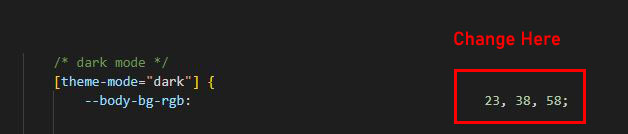
To change Dark body Color you have to open _variables.scss file and replace what color you want as shown in below

Rootpath : _variables.scss (src/assets/scss/_variables.scss )
Important License Terms
  • You cannot charge from your end product end users with a Regular License.
  • If you want to collect payments from end product end users then you must buy an Extended License for each of the end product.
  • You must buy one license for one domain only.(i.e Either Regular or Extended)
  • You cannot use Multi Domain,Multi Client, Multiple end Products with any of the licenses (i.e Either Regular or Extended).

for more details please click the link